February 10, 2026

Matrix Multiplication Java Program

This post shows a Java program to multiply two matrices.

To multiply one matrix with another you need to do a dot product of rows and columns. Let’s see it with an example where you are trying to multiply a 3X3 matrix with a 3X2 matrix.
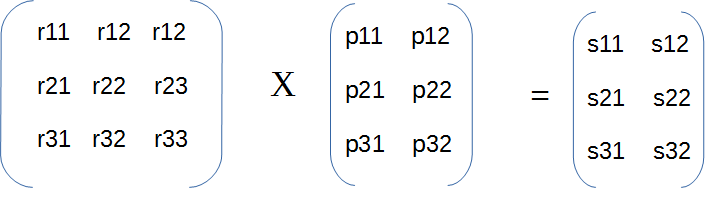
matrix multiplication Java program

How matrix multiplication happens here using dot product can be explained as follows-

First row of first matrix is multiplied with the first column of second matrix.

s11 = r11Xp11 + r12Xp21 + r13Xp31

Second row of first matrix is multiplied with the second column of second matrix.

s12 = r11Xp12 + r12Xp22 + r13Xp32

Then second row of first matrix is multiplied with the first column of second matrix.

s21 = r21Xp11 + r22Xp21 + r23Xp31

and so on...

Java program for matrix multiplication

In the matrix multiplication Java program, initially user is prompted to enter the matrices. You can also check that the number of columns in the first matrix are equal to the number of rows in the second matrix. Then using these two matrices you can do the multiplication.

import java.util.Scanner;

public class MatrixMultiplication {
  public static void main(String[] args) {
    Scanner in = new Scanner(System.in);
    System.out.print("Enter number of rows and columns in the matrix : ");
    int r1 = in.nextInt();
    int c1 = in.nextInt();
    // First matrix
    int[][] matrix1 = prepareMatrix(r1, c1);
    System.out.print("Enter number of rows and columns in the matrix : ");
    int r2 = in.nextInt();
    int c2 = in.nextInt();
		
    if(c1 != r2){
      in.close();
      throw new IllegalArgumentException("Number of columns in the first matrix should be equal to the number of rows in the second matrix");
    }
    // Second matrix
    int[][] matrix2 = prepareMatrix(r2, c2);
    // multiplied result stored in this matrix
    int multiplyMatrix[][] = new int[r1][c2];
    int sum = 0;
    for(int i = 0; i < r1; i++){
      for(int j = 0; j < c2; j++){                
        for(int k = 0; k < c1; k++){
          sum = sum + matrix1[i][k] * matrix2[k][j];
        }
        multiplyMatrix[i][j] = sum;
        sum = 0;
      }
    }        
		
    System.out.println("Multiplied Matrix : " );
    for(int i = 0; i < r1; i++){
      for(int j = 0; j < c2; j++){
        System.out.print(" " +multiplyMatrix[i][j]+"\t");
      }
      System.out.println();
    }
    if(in != null){
      in.close();
    }
  }

  private static int[][] prepareMatrix(int row, int column){
    Scanner sc = new Scanner(System.in);
    System.out.print("Enter elements of Matrix : ");
    int matrix[][] = new int[row][column];
    for(int i = 0; i < row; i++){
      for(int j = 0; j < column; j++){
        matrix[i][j] = sc.nextInt();
      }
    }
    System.out.println("Entered Matrix : " );
    for(int i = 0; i < row; i++){
      for(int j = 0; j < column; j++){
        System.out.print(" " +matrix[i][j]+"\t");
      }
      System.out.println();
    }
    return matrix;
  }
}
Output
Enter number of rows and columns in the matrix : 3 3
Enter elements of Matrix : 1 3 5 7 9 11 13 15 17
Entered Matrix : 
 1	 3	 5	
 7	 9	 11	
 13	 15	 17	
Enter number of rows and columns in the matrix : 3 3
Enter elements of Matrix : 2 4 6 8 10 12 14 16 18
Entered Matrix : 
 2	 4	 6	
 8	 10	 12	
 14	 16	 18	
Multiplied Matrix : 
 96	 114	 132	
 240	 294	 348	
 384	 474	 564	

That's all for the topic Matrix Multiplication Java Program. If something is missing or you have something to share about the topic please write a comment.


You may also like

Reverse an Array In-place Java Program

In this post we’ll see how to reverse an array in-place Java. Though it is easy to take another array and start storing elements from the last index to the first index of the original array to this new array in order to get reversed array but this approach means using auxiliary data structure, a new array to store the reversed elements making the space complexity of this approach O(n).

Using an in-place algorithm means additional space is not used and the space provided by the input data structure itself is used to modify the elements to get the output. Thus the Java program to reverse an array in-place will not use any additional array and swap elements with in the original array to get the reversed array as output.

Reverse array in-place Java program

One thing to note here is that you don’t need to iterate the whole array, you need to iterate only n/2 array for the array of size n. Since the first and last elements, second and second last and so on are swapped in each iteration so by the time middle element is reached the array is already reversed.

reverse array in place java
import java.util.Arrays;

public class ArrayReverseInplace {
  public static void main(String[] args) {
    int[] arr = {61, 34, 10, 0, 15, 112, 53, 78, 39, 68};
    reverseArray(arr);
  }

  static void reverseArray(int[] arr) {
    int n = arr.length;
    int temp;
    // Iterate till array length/2
    for (int i = 0; i < n / 2; i++) { 
      temp = arr[i]; 
      // Swapping
      arr[i] = arr[n - i - 1]; 
      arr[n - i - 1] = temp; 
    } 
    System.out.println("Reversed Array- " + Arrays.toString(arr));
  }
}
Output
Reversed Array- [68, 39, 78, 53, 112, 15, 0, 10, 34, 61]

As you can see in the Java program for reversing array in-place same input array space is used to do the reversal, only extra space required is for the auxiliary variables used.

That's all for the topic Reverse an Array In-place Java Program. If something is missing or you have something to share about the topic please write a comment.


You may also like

February 9, 2026

Matrix Subtraction Java Program

This post shows a Java program to subtract two matrices.

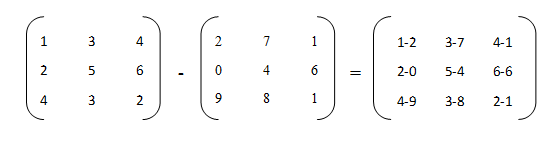
When you subtract two matrices you subtract the element at the same index in both matrices so you’ll subtract the element at index (0, 0) in the first matrix with the element at index (0, 0) in the second matrix to get the element at (0, 0) in the resultant matrix. Also note that both of the matrix have to be of the same order for subtraction.

For example– If you are subtracting two 3 X 3 matrices.

Matrix subtraction in Java

Java program for matrix subtraction

import java.util.Scanner;

public class MatrixSubtraction {

  public static void main(String[] args) {
    Scanner in = new Scanner(System.in);
    System.out.print("Enter number of rows and columns in the matrix : ");
    int row = in.nextInt();
    int column = in.nextInt();
    // First matrix
    int[][] matrix1 = prepareMatrix(row, column);
    
    // Second matrix
    int[][] matrix2 = prepareMatrix(row, column);
    // Subtraction result stored in this matrix
    int subtractMatrix[][] = new int[row][column];
    // Subtraction logic 
    for(int i = 0; i < row; i++){
      for(int j = 0; j < column; j++){
        subtractMatrix[i][j] = matrix1[i][j] - matrix2[i][j];
      }
    }
    
    System.out.println("Subtracted Matrix : " );
    for(int i = 0; i < subtractMatrix.length; i++){
      for(int j = 0; j < column; j++){
        System.out.print(" " +subtractMatrix[i][j]+"\t");
      }
      System.out.println();
    }
  }
	
  private static int[][] prepareMatrix(int row, int column){
    Scanner sc = new Scanner(System.in);
    System.out.print("Enter elements of Matrix : ");
    int matrix[][] = new int[row][column];
    for(int i = 0; i < row; i++){
      for(int j = 0; j < column; j++){
        matrix[i][j] = sc.nextInt();
      }
    }
    System.out.println("Entered Matrix : " );
    for(int i = 0; i < row; i++){
      for(int j = 0; j < column; j++){
        System.out.print(" " +matrix[i][j]+"\t");
      }
      System.out.println();
    }
    return matrix;
  }
}
Output
Enter number of rows and columns in the matrix :  3 3
Enter elements of Matrix : 1 3 8 2 9 3 0 5 11
Entered Matrix : 
 1	 3	 8	
 2	 9	 3	
 0	 5	 11	

Enter elements of Matrix : 0 2 4 6 7 8 2 3 5
Entered Matrix : 
 0	 2	 4	
 6	 7	 8	
 2	 3	 5
	
Subtracted Matrix : 
 1		1		4	
 -4		2		-5	
 -2		2		6	

That's all for the topic Matrix Subtraction Java Program. If something is missing or you have something to share about the topic please write a comment.


You may also like

How to Convert File to Byte Array in Java

This post shows different ways to convert file to byte array in Java.

  1. You can use read(byte[] b) method of FileInputStream class which reads up to b.length bytes of data from this input stream into byte array. See example.
  2. Java 7 onward you can use Files.readAllBytes() method which reads all the bytes from a file and return a byte array. See example.
  3. Apache CommonsIO also has methods IOUtils.toByteArray and FileUtils.readFileToByteArray to convert file to byte array. To use it you will have to put CommonsIO jar in your project’s classpath. See example.

Java program to convert file to byte array

Let’s see examples of converting file to byte array in Java using the above mentioned options.

Using read method of FileInputStream class

import java.io.File;
import java.io.FileInputStream;
import java.io.IOException;
import java.util.Arrays;

public class FileToBytearray {
  public static void main(String[] args) {
    File file = new File("D:\\test.txt");
    byte[] bArray = convertFileToByteArray(file);
    System.out.print(Arrays.toString(bArray));
  }
	
  private static byte[] convertFileToByteArray(File file){
    FileInputStream fis = null;
    // Creating bytearray of same length as file
    byte[] bArray = new byte[(int) file.length()];
    try{
      fis = new FileInputStream(file);
      // Reading file content to byte array
      fis.read(bArray);
      fis.close();                    
    }catch(IOException ioExp){
      ioExp.printStackTrace();
    }finally{
      if(fis != null){
        try {
          fis.close();
        } catch (IOException e) {
          // TODO Auto-generated catch block
          e.printStackTrace();
        }
      }
    }
    return bArray;
  }
}
Output
[49, 48, 48, 49, 124, 49, 48, 48, 51, 124, 50, 48, 48, 48, 13, 10, 49, 
48, 48, 54, 124, 50, 48, 48, 52, 124, 51, 48, 48, 48, 13, 10, 49, 48, 
48, 53, 124, 49, 48, 48, 55, 124, 49, 48, 48, 48, 48, 13, 10, 84, 104, 
105, 115, 32, 105, 115, 32, 97, 32, 116, 101, 115, 116, 32, 108, 105, 
110, 101, 46, 10, 76, 105, 110, 101, 32, 119, 114, 105, 116, 116, 101, 
110, 32, 98, 121, 32, 74, 97, 118, 97, 32, 112, 114, 111, 103, 114, 97, 
109, 32, 105, 110, 32, 107, 110, 112, 67, 111, 100, 101, 46, 99, 111, 
109, 46]

As you can see output is a series of bytes.

Using Files.readAllBytes() method to convert file to byte array

import java.io.IOException;
import java.nio.file.Files;
import java.nio.file.Path;
import java.nio.file.Paths;
import java.util.Arrays;

public class FileToBytearray {
  public static void main(String[] args) {       
    Path path = Paths.get("D:\\test.txt");
    try {
      byte[] bArray = Files.readAllBytes(path);
      System.out.println(Arrays.toString(bArray));
    } catch (IOException e) {
      System.out.println("Error while converting " + e.getMessage());
    }    
  }
}

Using Apache CommonsIO utility methods

As already mentioned there are two methods that can be used for converting file to byte array if Apache CommonsIO is used.

  • IOUtils.toByteArray- This method takes FileInputStream object as argument.
  • FileUtils.readFileToByteArray- Pass instance of File as argument.
Using IOUtile.toByteArray
import java.io.File;
import java.io.FileInputStream;
import java.io.IOException;
import java.util.Arrays;
import org.apache.commons.io.IOUtils;

public class FileToBytearray {
  public static void main(String[] args) {       
    File file = new File("D:\\test.txt");
    try(FileInputStream fis = new FileInputStream(file)) {
      byte[] bArray;
      bArray = IOUtils.toByteArray(fis);
      System.out.println(Arrays.toString(bArray));
    } catch (IOException e) {
      // TODO Auto-generated catch block
      e.printStackTrace();
    }
  }
}
Using FileUtils.readFileToByteArray
import java.io.File;
import java.io.IOException;
import java.util.Arrays;
import org.apache.commons.io.FileUtils;

public class FileToBytearray {
  public static void main(String[] args) {       
    File file = new File("D:\\test.txt");
    byte[] bArray;
    try {
      bArray = FileUtils.readFileToByteArray(file);
      System.out.println(Arrays.toString(bArray));
    } catch (IOException e) {
      // TODO Auto-generated catch block
      e.printStackTrace();
    }	
  }
}

That's all for the topic How to Convert File to Byte Array in Java. If something is missing or you have something to share about the topic please write a comment.


You may also like

February 8, 2026

Matrix Addition Java Program

This post shows a Java program to add two matrices.

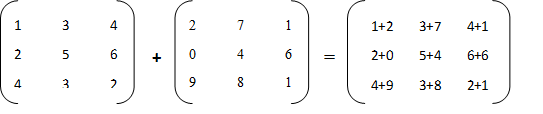
When you add two matrices you add the element at the same index in both matrices so you’ll add the element at index (0, 0) in the first matrix with the element at index (0, 0) in the second matrix to get the element at (0, 0) in the resultant matrix. Also note that both of the matrix have to be of the same order for addition.

For example– If you are adding two 3 X 3 matrices.

Matrix addition java program

Java program for matrix addition

import java.util.Scanner;
public class MatrixAddition {
  public static void main(String[] args) {
    Scanner in = new Scanner(System.in);
    System.out.print("Enter number of rows and columns in the matrix : ");
    int row = in.nextInt();
    int column = in.nextInt();
    // First matrix
    int[][] matrix1 = prepareMatrix(row, column);

    // Second matrix
    int[][] matrix2 = prepareMatrix(row, column);
    // addition result stored in this matrix
    int addedMatrix[][] = new int[row][column];
    // Addition logic 
    for(int i = 0; i < row; i++){
      for(int j = 0; j < column; j++){
        addedMatrix[i][j] = matrix1[i][j] + matrix2[i][j];
      }
    }
        
    System.out.println("Added Matrix : " );
    for(int i = 0; i < addedMatrix.length; i++){
      for(int j = 0; j < column; j++){
        System.out.print(" " +addedMatrix[i][j]+"\t");
      }
      System.out.println();
    }
  }
	
  private static int[][] prepareMatrix(int row, int column){
    Scanner sc = new Scanner(System.in);
    System.out.print("Enter elements of Matrix : ");
    int matrix[][] = new int[row][column];
    for(int i = 0; i < row; i++){
      for(int j = 0; j < column; j++){
        matrix[i][j] = sc.nextInt();
      }
    }
    System.out.println("Entered Matrix : " );
    for(int i = 0; i < row; i++){
      for(int j = 0; j < column; j++){
        System.out.print(" " +matrix[i][j]+"\t");
      }
      System.out.println();
    }
    return matrix;
  }
}
Output
Enter number of rows and columns in the matrix : 3 3
Enter elements of Matrix : 1 3 5 7 9 11 13 15 17
Entered Matrix : 
 1	 3	 5	
 7	 9	 11	
 13	 15	 17	
Enter elements of Matrix : 2 4 6 8 10 12 14 16 18
Entered Matrix : 
 2	 4	 6	
 8	 10	 12	
 14	 16	 18	
Added Matrix : 
 3	 7	 11	
 15	 19	 23	
 27	 31	 35	

That's all for the topic Matrix Addition Java Program. If something is missing or you have something to share about the topic please write a comment.


You may also like

February 7, 2026

Java Program to Find Maximum And Minimum Number in a Matrix

In this post we’ll see a Java program to find maximum and minimum number in a matrix or a 2D array.

Java program

Logic for finding the maximum and minimum number in a matrix goes as follows-

Initially assign the element at the index (0, 0) of the matrix to both min and max variables. Then iterate the matrix one row at a time and compare each element with the max variable first.

If max variable is less than the current element then assign the current element to the max variable, else compare current element with the min variable, if min variable is greater than the current element then assign the current element to the min element.

public class MaxAndMin {
  public static void main(String[] args) {
    Scanner in = new Scanner(System.in);
    System.out.print("Enter number of rows and columns in the matrix : ");
    int row = in.nextInt();
    int column = in.nextInt();
    // Prepare matrix
    System.out.print("Enter elements of Matrix : ");
    int matrix[][] = new int[row][column];
    for(int i = 0; i < row; i++){
      for(int j = 0; j < column; j++){
        matrix[i][j] = in.nextInt();
      }
    }
    System.out.println("Entered Matrix : " );
    for(int i = 0; i < row; i++){
      for(int j = 0; j < column; j++){
        System.out.print(" " +matrix[i][j]+"\t");
      }
      System.out.println();
    }
    // call method to find min and max in matrix
    findMinAndMax(matrix);
  }
 
  // Method to find maximum and minimum in matrix
  private static void findMinAndMax(int[][] matrix){     
    int maxNum = matrix[0][0];
    int minNum = matrix[0][0];
    for (int i = 0; i < matrix.length; i++) {
      for (int j = 0; j < matrix[i].length; j++) {
        if(maxNum < matrix[i][j]){ 
          maxNum = matrix[i][j]; 
        } else if(minNum > matrix[i][j]){
          minNum = matrix[i][j];
        }
      }
    }
    System.out.println("Max number: " + maxNum + 
          " Min number: " + minNum);
  }
}
Output
Enter number of rows and columns in the matrix : 3 3
Enter elements of Matrix : 3 6 12 34 19 5 32 16 7
Entered Matrix : 
 3	 6	 12	
 34	 19	 5	
 32	 16	 7	
Max number: 34 Min number: 3

That's all for the topic Java Program to Find Maximum And Minimum Number in a Matrix. If something is missing or you have something to share about the topic please write a comment.


You may also like

February 6, 2026

Java Program to Find The Maximum Element in Each Row of a Matrix

In this post we’ll see a Java program to find the maximum element in each row of a matrix.

For example if there is a matrix as given below-

10  8   6
0   13  7
17  3   15

Then program should find the maximum element for each row in the matrix as follows-

Maximum element in row-1 = 10

Maximum element in row-2 = 13

Maximum element in row-3 = 17

Java program - Finding max element in each row of a matrix

public class MatrixMaxElement {

  public static void main(String[] args) {
    Scanner in = new Scanner(System.in);
    System.out.print("Enter number of rows and columns in the matrix: ");
    int row = in.nextInt();
    int col = in.nextInt();
    // Prepare matrix
    int[][] matrix = prepareMatrix(row, col);
    findMaxInEachRow(matrix);
    in.close();
  }
  // Method to enter matrix elements
  private static int[][] prepareMatrix(int row, int column){
    Scanner sc = new Scanner(System.in);
    System.out.print("Enter elements of Matrix : ");
    int matrix[][] = new int[row][column];
    for(int i = 0; i < row; i++){
      for(int j = 0; j < column; j++){
        matrix[i][j] = sc.nextInt();
      }
    }
    sc.close();
    System.out.println("Entered Matrix : " );
    for(int i = 0; i < row; i++){
      for(int j = 0; j < column; j++){
        System.out.print(" " +matrix[i][j]+"\t");
      }
      System.out.println();
    }
    return matrix;
  }
  // Method to find the maximum element in each row
  private static void findMaxInEachRow(int[][] matrix){
    int[] tempArray = new int[matrix.length];
    for (int i = 0; i < matrix.length; i++) {
      // Start with first element of the row
      int max = matrix[i][0];
      for (int j = 0; j < matrix[i].length; j++) {
        if(max < matrix[i][j]){
          max = matrix[i][j];
        }
        tempArray[i] = max;
      }         
    }        
    // Displaying max elements
    for (int i = 0; i < tempArray.length; i++) {
      System.out.println("Maximum element in row-" + (i + 1) + " = " + tempArray[i]);
    }
  }
}
Output
Enter number of rows and columns in the matrix: 3 3
Enter elements of Matrix : 10 8 6
0 13 7
17 3 15
Entered Matrix : 
 10	 8	 6	
 0	 13	 7	
 17	 3	 15	
Maximum element in row-1 = 10
Maximum element in row-2 = 13
Maximum element in row-3 = 17

That's all for the topic Java Program to Find The Maximum Element in Each Row of a Matrix. If something is missing or you have something to share about the topic please write a comment.


You may also like

February 5, 2026

Remove Element From an Array in Java

In this post we’ll see how to remove or delete element from an array in Java. You have several options to do that task of removing an element from an array.

  1. Write your own logic. See example.
  2. Use System.arraycopy() method for removing element from an array. See example.
  3. Use Apache Commons library. In that library there is a ArrayUtils class that has remove method for that purpose. See example.
  4. Use ArrayList to remove an element. You will need to convert array to ArrayList and then back to array. See example.

Writing your own logic

If you have to write your own Java program to remove element from an array then you will have to shift all the elements, to the left, that come after the element that has to be removed. Another thing that you will have to consider is; once created array is of fixed length so after shifting all the elements there will still be one space left in the array and that space will be filled by repeating the last element. Let’s see with an example.

Java Program to remove element from an array

import java.util.Scanner;

public class RemoveArrayElement {
  public static void main(String[] args) {
    Scanner in = new Scanner(System.in);
    int[] numArray = {6, 8, 10, 34, 12, 2};

    System.out.print("Enter Element to be deleted: ");
    int element = in.nextInt();
    
    for(int i = 0; i < numArray.length; i++){
      if(numArray[i] == element){
        // shift elements to the left
        for(int j = i; j < numArray.length - 1; j++){
          numArray[j] = numArray[j+1];
        }
        break;
      }
    }
    
    System.out.println("Array elements after deletion-- " );
    for(int i = 0; i < numArray.length; i++){
      System.out.print(" " + numArray[i]);
    }  
  }
}
Output
Enter Element to be deleted: 10
Array elements after deletion-- 
 6 8 34 12 2 2

You can see the empty space after shifting the elements is filled by repeating the last element.

What you can do is to create another array of size one less than the original array. After shifting the elements you can copy element from the original array to the new array, leaving the last element. For copying the array you can use System.arraycopy() method.

public static void arraycopy(Object src, int srcPos, Object dest, int destPos, int length)- Copies an array from the specified source array, beginning at the specified position, to the specified position of the destination array. The number of components copied is equal to the length argument.

import java.util.Scanner;

public class RemoveArrayElement {
  public static void main(String[] args) {
    Scanner in = new Scanner(System.in);
    int[] numArray = {6, 8, 10, 34, 12, 2};
    
    System.out.print("Enter Element to be deleted: ");
    int element = in.nextInt();
    int[] newArray = new int[numArray.length - 1];
    
    for(int i = 0; i < numArray.length; i++){
      if(numArray[i] == element){
        // shift elements to the left
        for(int j = i; j < numArray.length - 1; j++){
          numArray[j] = numArray[j+1];
        } 
        // Copy array
        System.arraycopy(numArray, 0, newArray, 0, numArray.length - 1);
        break;
      }
    }
    
    System.out.println("Array elements after deletion-- " );
    for(int i = 0; i < newArray.length; i++){
      System.out.print(" " + newArray[i]);
    }  
  }
}
Output
Enter Element to be deleted: 10
Array elements after deletion-- 
 6 8 34 12 2

As you can see now the problem of extra element is resolved.

Using System.arraycopy() method to delete array element

You can use System.arraycopy() method to remove element from an array in Java. Once you know the index of the element that has to be removed you can call System.arraycopy() method twice, once for copying the element from 0 till the index and then from index + 1 till the end of the array.

import java.util.Scanner;

public class RemoveArrayElement {
  public static void main(String[] args) {
    Scanner in = new Scanner(System.in);
    int[] numArray = {6, 8, 10, 34, 12, 2};

    System.out.print("Enter Element to be deleted: ");
    int element = in.nextInt();
    int[] newArray = new int[numArray.length - 1];
    
    for(int i = 0; i < numArray.length; i++){
      if(numArray[i] == element){
        // Copy array
        System.arraycopy(numArray, 0, newArray, 0, i);
        System.arraycopy(numArray, i + 1, newArray, i, (numArray.length - (i+1)));
        break;
      }
    }
    
    System.out.println("Array elements after deletion-- " );
    for(int i = 0; i < newArray.length; i++){
      System.out.print(" " + newArray[i]);
    }  
  }
}
Output
Enter Element to be deleted: 34
Array elements after deletion-- 
 6 8 10 12 2

Enter Element to be deleted: 6
Array elements after deletion-- 
 8 10 34 12 2

Using ArrayUtils class in Apache Commons

You can also use ArrayUtils.remove() method in ArrayUtils class to remove element from an array in Java. For that you will have to have Apache commons jar in classpath.

import java.util.Scanner;

import org.apache.commons.lang3.ArrayUtils;

public class RemoveArrayElement {
  public static void main(String[] args) {
    Scanner in = new Scanner(System.in);
    int[] numArray = {6, 8, 10, 34, 12, 2};

    System.out.print("Enter Element to be deleted: ");
    int element = in.nextInt();
    
    for(int i = 0; i < numArray.length; i++){
      if(numArray[i] == element){
        // Using ArrayUtils class
        numArray = ArrayUtils.remove(numArray, i);
        break;
      }
    }
    
    System.out.println("Array elements after deletion-- " );
    for(int i = 0; i < numArray.length; i++){
      System.out.print(" " + numArray[i]);
    }  
  }
}
Output
Enter Element to be deleted: 12
Array elements after deletion-- 
 6 8 10 34 2

Converting array to ArrayList to remove element from array

You can convert array to ArrayList and then remove the element from that ArrayList. After removal of element you can convert ArrayList back to array.

import java.util.ArrayList;
import java.util.Arrays;
import java.util.List;
import java.util.Scanner;

public class RemoveArrayElement {
  public static void main(String[] args) {
    Scanner in = new Scanner(System.in);
    Integer[] numArray = {6, 8, 10, 34, 12, 2};
    System.out.print("Enter Element to be deleted: ");
    int element = in.nextInt();
    
    for(int i = 0; i < numArray.length; i++){
      if(numArray[i] == element){
        numArray = removeElement(numArray, i);
        break;
      }
    }
    
    System.out.println("Array elements after deletion-- " );
    for(int i = 0; i < numArray.length; i++){
      System.out.print(" " + numArray[i]);
    }  
  }

  public static Integer[] removeElement( Integer[] numArray, int index ){
    // Converting to list
    List tempList = new ArrayList(Arrays.asList(numArray));
    tempList.remove(index);
    // converting back to array
    return tempList.toArray(new Integer[0]);
  }
}
Output
Enter Element to be deleted: 8
Array elements after deletion-- 
 6 10 34 12 2

That's all for the topic Remove Element From an Array in Java. If something is missing or you have something to share about the topic please write a comment.


You may also like

February 4, 2026

Java Program to Find Common Element Between Two Arrays

In this post we’ll see a Java program to find common elements between two arrays. For writing this program you may be asked not to use any inbuilt Java method, in that case you can iterate the arrays using for loop and list the common elements.

If it is permitted to use any inbuilt method then you can use retainAll() method of the Set in Java to get the common elements between two arrays.

Finding common elements between two arrays – Iterative

In this solution you can iterate one of the array in an outer loop and compare each element with all the elements of another array using an inner loop.

public class CommonElement {
  public static void main(String[] args) {
    int[] arr1 = {3, 10, 1, 0, 9};
    int[] arr2 = {32, 5, 10, 6, 9, 1};
    for(int i = 0; i < arr1.length; i++){
      for(int j = 0; j < arr2.length; j++){
        if(arr1[i] == arr2[j]){
          System.out.print(arr1[i] + " ");
          break;
        }
      }
    }
  }
}
Output
10 1 9

Finding common elements between two sorted arrays

Above solution is O(N2), if you can sort the arrays then you can reduce the time to O(2NLogN + N).

After sorting the arrays you compare elements of the arrays in a while loop and increment only one of the array index if the elements are not equal otherwise increment index in both the arrays.

public class CommonElement {
  public static void main(String[] args) {
    int[] arr1 = {6, 8, 1, 0, 9};
    int[] arr2 = {34, 2, 1, 9, 12, 67, 0};
    findCommonElement(arr1, arr2);
  }
  public static void findCommonElement(int[] arr1, int[] arr2){
    // sort arrays
    Arrays.sort(arr1);
    Arrays.sort(arr2);
    int lengthArr1 = arr1.length;
    int lengthArr2 = arr2.length;
    int i = 0, j = 0;
    while(i < lengthArr1 && j < lengthArr2){
      // compare and increment
      if(arr1[i] > arr2[j]){
        j++;
      }else if (arr2[j] > arr1[i]){
        i++;
      }else{
        //Print common element
        System.out.print(arr1[i] + " ");
        i++;
        j++;
      }
    }
  }
}
Output
0 1 9

Finding common elements between two arrays using HashSet

You can also use the retainAll() method of the HashSet to find the common elements between two arrays.

retainAll() method retains only those elements of the Set that are contained in the passed Collection.

public class CommonElement {

  public static void main(String[] args) {
    int[] arr1 = {3, 10, 1, 0, 9};
    int[] arr2 = {32, 5, 10, 6, 9, 1};
    findCommonElement(arr1, arr2);
  }
  public static void findCommonElement(int[] arr1, int[] arr2){
    Set<Integer> set1 = new HashSet<>();
    Set<Integer> set2 = new HashSet<>();
    // adding elements from array1
    for(int i : arr1){
      set1.add(i);
    }
    // adding elements from array2
    for(int i : arr2){
      set2.add(i);
    }
    set1.retainAll(set2);
    System.out.println("Common elements- " + set1);
  }
}
Output
Common elements- [1, 9, 10]

That's all for the topic Java Program to Find Common Element Between Two Arrays. If something is missing or you have something to share about the topic please write a comment.


You may also like

Java Program to Remove Duplicate Elements From an Array

This post shows various ways to remove duplicate elements from an array in Java. The options you have are as follows-

  1. Create a LinkedHashSet by passing the array. Since Set only stores unique elements so duplicates are automatically removed by this process. Since LinkedHashSet maintains the insertion order so array element sequence too would not be disturbed. See example.
  2. Write your own logic in Java to remove duplicate elements from an array. See example.
  3. Using distinct() method of the Java Stream API you can remove duplicate elements from an array. This option is available Java 8 onward. See example.

Removing duplicates from an array using LinkedHashSet

public class RemoveDuplicates {
  public static void main(String[] args) {
    int[] numArr = {1, 1, 6, 7, 56, 9, 1, 23, 56, 7, 9, 10, 10};
    System.out.println("Original Array- " + Arrays.toString(numArr));
    int[] tempArr = findAndRemoveDuplicates(numArr);
    System.out.println("After removing duplicates- " + Arrays.toString(tempArr));
  }

  public static int[] findAndRemoveDuplicates(int[] numArr){
    // creating List from array
    List<Integer> numList = new ArrayList<Integer>();
    for(int i : numArr){
      numList.add(i);
    }
    Set<Integer> set = new LinkedHashSet<Integer>(numList);
    // Putting elements back in array
    int[] tempArray = new int[set.size()];
    int j =0;
    for(int num:set){
      tempArray[j++] = num;
    }
    return tempArray;
  }
}
Output
Original Array- [1, 1, 6, 7, 56, 9, 1, 23, 56, 7, 9, 10, 10]
After removing duplicates- [1, 6, 7, 56, 9, 23, 10]

As you can see from the output, because of using LinkedHashSet, ordering of the elements in array is not changed.

Removing duplicates from an array Java program – Own logic

If you are not supposed to use any Java Collection API or any other Java API for that matter then you can write your own logic to pick one element of the array at a time and scan the whole array in another inner loop to check if that element is repeated. If yes you need to remove it.

Removing element from array would require some work as array is of fixed size once created. So removing an element means shifting all the elements, which are after the removed element, to the left to fill that gap. But there is another problem once you shift elements to the left a space is created at the end of the array. To overcome that problem you need to keep track of how many elements are removed and reduce array size accordingly. With that reduced size create a new array and copy elements from original array with in the range 0 – reduced size.

To see various options to remove element from an array, please refer this post- Remove Element From an Array in Java

Following program remove duplicates from an array and also retains the order of the array.

public class RemoveDuplicates {
  public static void main(String[] args) {
    int[] numArr = {6, 6, 4, 15, 7, 6, 12, 7, 12, 12, 3, 8};
    System.out.println("Original Array- " + Arrays.toString(numArr));
    int[] tempArr = findAndRemoveDuplicates(numArr);
    System.out.println("After removing duplicates- " + Arrays.toString(tempArr));
  }
	
  public static int[] findAndRemoveDuplicates(int[] numArr){
    int size = numArr.length;
    for(int i = 0; i < size; i++){
      // for each element check for duplicates
      for(int j = i+1; j < size;){
        if(numArr[i] == numArr[j]){
          // shift elements to the left to remove duplicate
          for(int k = j; k < size-1; k++){
            numArr[k] = numArr[k+1];
          }
          size = size - 1;
        }else{
          j++;
        }
      }
    }
    // create temp array of reduced size
    int[] tempArray = new int[size];
    // copy array elements
    System.arraycopy(numArr, 0, tempArray, 0, size);
    return tempArray;
  }
}
Output
Original Array- [6, 6, 4, 15, 7, 6, 12, 7, 12, 12, 3, 8]
After removing duplicates- [6, 4, 15, 7, 12, 3, 8]

If you have a sorted array then you can use following program to remove duplicates from an array. This code uses only a single loop thus reducing the time complexity.

Logic here is to have to two variables to compare adjacent array elements (0 and 1 to start with) if elements are equal then increment one of the variable. Swap elements only when elements are not equal, that way duplicate elements are pushed to the right.

Then create a temp array with reduced size to keep only the unique elements.

public class RemoveDuplicates {
  public static void main(String[] args) {
    //int[] numArr = {4, 6, 6, 4, 15, 7, 6, 12, 7, 12, 12, 3, 8};
    int[] numArr = {1, 1, 1, 6, 7, 7, 9, 9, 10, 10, 23, 56, 56};
    System.out.println("Original Array- " + Arrays.toString(numArr));
    int[] tempArr = findAndRemoveDuplicates(numArr);
    
    System.out.println("After removing duplicates- " + Arrays.toString(tempArr));
  }
	
  public static int[] findAndRemoveDuplicates(int[] numArr){
    int i = 1;
    int j = 0;
    while(i < numArr.length){
      if(numArr[i] == numArr[j]){
        i++;
      }else{
        numArr[++j] = numArr[i++];
      } 
    }
    //create temp array with reduced size
    int[] tempArray = Arrays.copyOf(numArr, j+1);
    return tempArray;
  }
}

Removing duplicates from sorted array using Java Streams

Java 8 onward you can also use distinct() method of the Java Stream API to remove duplicates from an array in a very compact way.

distinct() method returns a stream consisting of the distinct elements, for duplicated elements, the element appearing first in the encounter order is preserved.

public class RemoveDuplicates {
  public static void main(String[] args) {
    int[] numArr = {4, 6, 6, 4, 15, 7, 6, 12, 7, 12, 12, 3, 8};
    System.out.println("Original Array- " + Arrays.toString(numArr));
    int tempArray[] = Arrays.stream(numArr).distinct().toArray();	
    System.out.println("After removing duplicates- " + Arrays.toString(tempArray));
  }
}
Output
Original Array- [4, 6, 6, 4, 15, 7, 6, 12, 7, 12, 12, 3, 8]
After removing duplicates- [4, 6, 15, 7, 12, 3, 8]

That's all for the topic Java Program to Remove Duplicate Elements From an Array. If something is missing or you have something to share about the topic please write a comment.


You may also like

February 3, 2026

Java Program to Find Maximum And Minimum Values in an Array

To find maximum and minimum values in an array in Java you can use one of the following options-

  1. Iterate the array and look for the maximum and minimum values. See example.
  2. You can also write a recursive method to recursively go through the array to find maximum and minimum values in an array. See example.
  3. You can use Arrays.sort() method to sort the array and then take the first and last elements of that sorted array. See example.

Iterating array to find largest and smallest values

Start by having two variables (max and min) with initial value as the first element of the array. Iterate through the array and compare current element with max variable, if current array element is greater than the max then assign the current element to max. Otherwise compare element with min variable, if current array element is less than the min then assign the current element to min.

public class MaxMinArray {
  public static void main(String[] args) {
    int arr[] = {54, 24, -4, 0, 2, 45, 54, -9, 7};		 
    // assign first array element to two variables
    int max = arr[0];
    int min = arr[0];
    // iterate and compare from array index 1
    for(int i = 1; i < arr.length; i++){
      if(max < arr[i]){
        max = arr[i];
      }else if(min > arr[i]){
        min = arr[i];
      }		   		   
    }
    System.out.println("Maximum number = " 
         + max + " Minimum number = " + min);		
  }
}
Output
Maximum number = 54 Minimum number = -9

Find maximum and minimum values in array using recursion

public class MaxMinArray {
  public static void main(String[] args) {
    int arr[] = {54, 24, 4, 0, 2, 45, 55, 9, -7, 68};	
    int max = maxUsingRecursion(arr, arr[0], 0);
    int min = minUsingRecursion(arr, arr[0], 0);
    System.out.println("Maximum number = " 
         + max + " Minimum number = " + min);		
  }

  private static int maxUsingRecursion(int[] arr, int num, int size){	
    // base case
    if(size == arr.length){
      return arr[size-1];	
    }
    return Math.max(num, maxUsingRecursion(arr, arr[size], ++size));
  }

  private static int minUsingRecursion(int[] arr, int num, int size){
    // base case
    if(size == arr.length)
      return arr[size-1];
    return Math.min(num, minUsingRecursion(arr, arr[size], ++size));
  }
}
Output
Maximum number = 68 Minimum number = -7

Find maximum and minimum values in array by sorting

public class MaxMinArray {
  public static void main(String[] args) {
    int arr[] = {54, 24, 4, 0, 2, 45, 55, 9, -7, 68};
    Arrays.sort(arr);

    System.out.println("Maximum number = " 
         + arr[arr.length - 1] + " Minimum number = " + arr[0]);		
  }
}
Output
Maximum number = 68 Minimum number = -7

That's all for the topic Java Program to Find Maximum And Minimum Values in an Array. If something is missing or you have something to share about the topic please write a comment.


You may also like