January 29, 2026

Java Program to Check if Armstrong Number

In this post we’ll see a Java program to check if the passed number is an Armstrong number or not. A number is an Armstrong number if it is equal to the number you get by raising every digit of the number to the power of count of digits in the number and adding them.

Armstrong number example-

371 = 33 + 73 + 13 = 27 + 343 +1 = 371

Number of digits is 3 here so every digit is raised to the power of 3 and added. Since the calculated number is equal to the original number so 371 is an Armstrong number.

1634 = 14 + 6 4 + 34 + 44 = 1 + 1296 + 81 + 256 = 1634

Java code to check if number Armstrong number or not

import java.util.Scanner;

public class ArmstrongNumber {
  public static void main(String[] args) {
    Scanner sc = new Scanner(System.in);
    System.out.println("Please enter a number : ");	     
    int number = sc.nextInt();

    System.out.println("Is " + number + " an Armstrong number- " + checkIfArmstrong(number));
    sc.close();
  }
	
  private static boolean checkIfArmstrong(int number){
    // Converting to string and calculating length
    int numLength = (number+"").length();
    int temp = number;
    int sum = 0;
    while(temp != 0 ){
      int remainder = temp % 10;
      sum = sum + (int)Math.pow(remainder, numLength);
      temp = temp/10;
    }
    if(number == sum){
      return true;
    }else{
      return false;
    }	
  }
}
Output
Please enter a number : 
371
Is 371 an Armstrong number- true

Please enter a number : 
1634
Is 1634 an Armstrong number- true

Please enter a number : 
373
Is 373 an Armstrong number- false

That's all for the topic Java Program to Check if Armstrong Number. If something is missing or you have something to share about the topic please write a comment.


You may also like

January 28, 2026

Java Program to Display Armstrong Numbers

This post shows how you can generate and display Armstrong numbers in Java with in the given range. A number is an Armstrong number if it is equal to the sum of its digit raised to the power of count of digits in the number. For example

371 = 33 + 73 + 13 = 27 + 343 +1 = 371

Number of digits is 3 here so every digit is raised to the power of 3 and added. Since the calculated number is equal to the original number so 371 is an Armstrong number.

1634 = 14 + 6 4 + 34 + 44 = 1 + 1296 + 81 + 256 = 1634

Display Armstrong numbers within the given range - Java Program

import java.util.Scanner;

public class ArmstrongNumber {
  public static void main(String[] args) {
    Scanner sc = new Scanner(System.in);
    System.out.println("Enter start number for displaying Armstrong numbers  - ");
    int start = sc.nextInt();

    System.out.println("Enter end number for displaying Armstrong numbers  - ");
    int end = sc.nextInt();
    System.out.print("Armstrong numbers with in " + start + " and " + end + "- ");
    for(int i = start; i <= end; i++){ 
      if(checkIfArmstrong(i)){
        System.out.print(i + " ");
      }
    }
    sc.close();
  }
  private static boolean checkIfArmstrong(int number){
    // Converting to string and calculating length
    int numLength = (number+"").length();
    int temp = number;
    int sum = 0;
    while(temp > 0 ){
      int remainder = temp % 10;
      sum = sum + (int)Math.pow(remainder, numLength);
      temp = temp/10;
    }
    if(number == sum){
      return true;
    }else{
      return false;
    }	
  }
}
Output
Enter start number for displaying Armstrong numbers  - 
10
Enter end number for displaying Armstrong numbers  - 
10000

Armstrong numbers with in 10 and 10000- 153 370 371 407 1634 8208 9474 

That's all for the topic Display Armstrong Numbers in Java. If something is missing or you have something to share about the topic please write a comment.


You may also like

January 27, 2026

Java Program to Find Factorial

In this post we’ll see a Java program to find the factorial of a number.

Factorial of a non-negative integer n is product of all positive integers less than or equal to n. For example

5! = 5 X 4 X 3 X 2 X 1 = 120

Factorial program in Java

Factorial program in Java can be written as both iterative as well as recursive solution. In this post both of the solutions are given.

Factorial program using iteration

In the following program user is asked to enter the number for which factorial has to be calculated. In iterative logic you can start a for loop with the entered number and decrease it by 1 in each iteration. What you need is the multiplication of all the numbers in the loop.

import java.util.Scanner;

public class Factorial {
  public static void main(String[] args) {
    // Input from user
    Scanner input = new Scanner(System.in);
    System.out.println("Enter a number: ");
    int number = input.nextInt();
    int factorial = 1;
    for(int i = number; i >= 1; i--){
      factorial = factorial * i; 
    }
    System.out.println("Factorial of " + number + " is " + factorial); 
  }
}
Output
Enter a number: 
5
Factorial of 5 is 120

Factorial program in Java using recursion

In the recursive logic to write factorial Java program, you need to call the same method recursively passing the (number – 1) as parameter every time until the base case (number = 1) is reached.

import java.util.Scanner;

public class Factorial {
  public static void main(String[] args) {
    // Input from user
    Scanner input = new Scanner(System.in);
    System.out.println("Enter a number: ");
    int number = input.nextInt();
    int factorial = calculateFactorial(number);

    System.out.println("Factorial of " + number + " is " + factorial); 
  }
	
  // Factorial using recursion
  private static int calculateFactorial(int num){
    // base case
    if(num == 1){
      return 1;
    }else{
      return num * calculateFactorial(num - 1);
    }
  }
}
Output
Enter a number: 
8
Factorial of 8 is 40320

That's all for the topic Java Program to Find Factorial. If something is missing or you have something to share about the topic please write a comment.


You may also like
January 26, 2026

Fibonacci Series Java Program

In this post we’ll see a Java program to display Fibonacci series.

Fibonacci series is a series of natural number where next number is the sum of previous two numbers i.e. fn = fn-1 + fn-2. For example

0, 1, 1, 2, 3, 5, 8, 13, 21 ......

Java program for displaying Fibonacci series can be written using-

  1. Recursive logic. See example.
  2. Non-recursive logic. See example.

Fibonacci series program using recursion logic

import java.util.Scanner;

public class FibonacciSeries {
  public static void main(String[] args) {
    Scanner sc = new Scanner(System.in);
    //user input
    System.out.println("Enter length of the Fibonacci series: ");
    int num = sc.nextInt();
    for(int i = 0; i < num; i++){
      System.out.print(displayFibonacci(i) + " ");
    }
  }
	
  private static int displayFibonacci(int num){
    if(num == 0){
      return 0;
    }
    if(num == 1){
      return 1;
    }
    // sum of previous two numbers - calling recursively
    return displayFibonacci(num - 1) + displayFibonacci(num - 2);
  }
}
Output
Enter length of the Fibonacci series: 
10
0 1 1 2 3 5 8 13 21 34 

Fibonacci series Java program using iteration

import java.util.Scanner;

public class FibonacciSeries {
  public static void main(String[] args) {
    Scanner sc = new Scanner(System.in);
    //user input
    System.out.println("Enter length of the Fibonacci series: ");
    int num = sc.nextInt();

    displayFibonacci(num);
  }
	
  private static void displayFibonacci(int num){
    int num1 = 0;
    int num2 = 1;
    int num3 = 0;
    for(int i = 0; i <num; i++){
      System.out.print(num3+" ");
      num1 = num2;
      num2 = num3;
      num3 = num1 + num2;
    }
  }
}
Output
Enter length of the Fibonacci series: 
15
0 1 1 2 3 5 8 13 21 34 55 89 144 233 377 

That's all for the topic Fibonacci Series Java Program. If something is missing or you have something to share about the topic please write a comment.


You may also like

January 25, 2026

Arrange Given Numbers to Form The Biggest Number in Java

In this post we’ll see how to write a Java program to arrange given non-negative numbers to form the biggest number. For example if there is an array of numbers {45, 3, 89, 123} then the numbers should be arranged as 89453123 to form the biggest number. If array of integers is {5, 6, 50, 4} then these numbers should be arranged as 65504.

Arrange numbers to form the biggest number solution

If you compare the given numbers as integers to arrange them in decreasing order then for numbers 6 and 50, you will get number as 506 as 50 is greater than 6. So this approach won’t work.

If you convert integer to String and then compare then you may get the numbers in required order. That happens because of the fact that String comparison is lexicographical or alphabetical. In lexicographic order if two strings are compared to determine which one is greater then comparison happens character by character and the first character where these Strings differ determine the order. For example if "Any" and "Amy" are compared to place them in decreasing order then the order is “Any” then “Amy” as n comes after m.

Same way if numbers are compared as String then on comparing “6” and “50” order is 6, 50 as 6 comes after 5.

As an extra precaution you also need to append the first number to the second and second to the first before comparison. For example if you have two numbers A and B then comparison is done for AB and BA (after appending numbers). This is required for strings like “5” and “50” where comparison will place “50” first and then “5”. By appending you won’t have this problem.

Java program to arrange given numbers to form the biggest number

public class ArrangeNumbers {
  public static void main(String[] args) {
    List<Integer> listOfNumbers = Arrays.asList(11, 10, 9, 99, 98);  
    Collections.sort(listOfNumbers, new MyComparator());
    System.out.println("Biggest number is-");
    // Biggest number
    for(Integer i : listOfNumbers){
     System.out.print(i);
    }
  }
}
// Custom comparator for comparison
class MyComparator implements Comparator<Integer>{
  @Override
  public int compare(Integer i, Integer j) {
    // Appending before comparison
    String str1 = i.toString() + j.toString();
    String str2 = j.toString() + i.toString();
    return str2.compareTo(str1);
  }
}
Output
Biggest number is-
999981110

That's all for the topic Arrange Given Numbers to Form The Biggest Number in Java. If something is missing or you have something to share about the topic please write a comment.


You may also like

Java Program to Convert Numbers to Words

This post shows how you can write a Java program to convert numbers to words.

For example- If you enter number 123 output should be One hundred twenty three in words. In the post, conversion of number to words is done for both international system and Indian system.

Java program for converting number to words – International system

If you observe in international system comma is placed after every three digits.

223,544,578– Two hundred twenty three million five hundred forty four thousand five hundred seventy eight.

Three digits placed in between each comma are worded in the same way, as shown in the above example 223- Two hundred twenty three, 544- five hundred forty four. You just need to put the correct denomination in between the three digits.

This observation forms the logic for the Java program to convert number to words. Starting from right take 3 digits at a time and convert them to word and place the correct denomination in progression.

public class NumberToWord {
  private static final String[] units = {
    "",
    " one",
    " two",
    " three",
    " four",
    " five",
    " six",
    " seven",
    " eight",
    " nine"
  }; 
  private static final String[] doubles = {
    " ten",
    " eleven",
    " twelve",
    " thirteen",
    " fourteen",
    " fifteen",
    " sixteen",
    " seventeen",
    " eighteen",
    " nineteen"
  };
  private static final String[] tens = {
    "",
    "",
    " twenty",
    " thirty",
    " forty",
    " fifty",
    " sixty",
    " seventy",
    " eighty",
    " ninety"
  };
  private static final String[] hundreds = {
    "",
    " thousand",
    " million",
    " billion"
  };

  private static String convertToWord(int number) {    
    String word = "";    
    int index = 0;
    do {
      // take 3 digits at a time
      int num = number % 1000;
      if (num != 0){
          String str = convertThreeOrLessThanThreeDigitNum(num);
          word = str + hundreds[index] + word;
      }
      index++;
      // move left by 3 digits
      number = number/1000;
    } while (number > 0);
    return word;
  }
  private static String convertThreeOrLessThanThreeDigitNum(int number) {
    String word = "";    
    int num = number % 100;
    // Logic to take word from appropriate array
    if(num < 10){
      word = word + units[num];
    }
    else if(num < 20){
      word = word + doubles[num%10];
    }else{
      word = tens[num/10] + units[num%10];
    }
    word = (number/100 > 0)? units[number/100] + " hundred" + word : word;
    return word;
  }
        
  public static void main(String[] args) {
    System.out.println("Number-- " + convertToWord(123456789));
    System.out.println("Number-- " + convertToWord(78));
    System.out.println("Number-- " + convertToWord(35658));
    System.out.println("Number-- " + convertToWord(2367904));
    System.out.println("Number-- " + convertToWord(1700));
  }
}
Output
Number--  one hundred twenty three million four hundred fifty six thousand seven hundred eighty nine
Number--  seventy eight
Number--  thirty five thousand six hundred fifty eight
Number--  two million three hundred sixty seven thousand nine hundred four
Number--  one thousand seven hundred

Note that this program works till billion, if you want to go further then add it in “hundreds” array. You will also need to change the type from int to double.

Java program for converting number to words – Indian system

If you observe in Indian system comma is placed after every two digits, barring the first instance where it is placed after three digits.

22,35,44,578– Twenty two crore thirty five lakh forty four thousand five hundred and seventy eight only

In Indian system, starting from right you need to take 3 digits first time and then move by 2 digits in every iteration.

public class NumberToWord {
  private static final String[] units = {
    "",
    " one",
    " two",
    " three",
    " four",
    " five",
    " six",
    " seven",
    " eight",
    " nine"
  }; 
  private static final String[] doubles = {
    " ten",
    " eleven",
    " twelve",
    " thirteen",
    " fourteen",
    " fifteen",
    " sixteen",
    " seventeen",
    " eighteen",
    " nineteen"
  };
  private static final String[] tens = {
    "",
    "",
    " twenty",
    " thirty",
    " forty",
    " fifty",
    " sixty",
    " seventy",
    " eighty",
    " ninety"
  };

  private static final String[] hundreds = {
    "",
    " thousand",
    " lakh",
    " crore",
    " arab",
    " kharab"
  };

  private static String convertToWord(int number) {    
    String num = "";    
    int index = 0;
    int n;
    int digits;
    boolean firstIteration = true;
    do {
      if(firstIteration){
        digits = 1000;
      }else{
        digits = 100;
      }
      n = number % digits;
      if (n != 0){
        String s = convertThreeOrLessThanThreeDigitNum(n);
        num = s + hundreds[index] + num;
      }
      index++;
      number = number/digits;
      firstIteration = false;
    } while (number > 0);
    return num;
  }
  private static String convertThreeOrLessThanThreeDigitNum(int number) {
    String word = "";    
    int num = number % 100;
    // Logic to take word from appropriate array
    if(num < 10){
      word = word + units[num];
    }
    else if(num < 20){
      word = word + doubles[num%10];
    }else{
      word = tens[num/10] + units[num%10];
    }
    word = (number/100 > 0)? units[number/100] + " hundred" + word : word;
    return word;
  }
        
  public static void main(String[] args) {
    System.out.println("Number-- " + convertToWord(1112345678));
    System.out.println("Number-- " + convertToWord(78));
    System.out.println("Number-- " + convertToWord(35658));
    System.out.println("Number-- " + convertToWord(2367904));
    System.out.println("Number-- " + convertToWord(1700));
  }
}
Output
Number--  one arab eleven crore twenty three lakh forty five thousand six hundred seventy eight
Number--  seventy eight
Number--  thirty five thousand six hundred fifty eight
Number--  twenty three lakh sixty seven thousand nine hundred four
Number--  one thousand seven hundred

That's all for the topic Java Program to Convert Numbers to Words. If something is missing or you have something to share about the topic please write a comment.


You may also like
January 24, 2026

How to Convert int to String in Java

This post shows several ways to convert int to String in Java.

Convert using Integer.toString() method

Wrapper class Integer has a toString() method that returns a String object representing the passed integer. Using this method you can convert int to String in Java.

public class IntToString {
  public static void main(String[] args) {
    int val = 35;
    String strVal = Integer.toString(val);
    System.out.println("Converted String value = " + strVal);
  }
}
Output
Converted String value = 35

Convert using String.valueOf() method

String.valueOf(int i)- Returns the string representation of the int argument.

public class IntToString {
  public static void main(String[] args) {
    int val = -35;
    String strVal = String.valueOf(val);
    System.out.println("Converted String value = " + strVal);
  }
}
Output
Converted String value = -35

Converting using String concatenation

You can concatenate the int value with an empty string ("") that will return the result as a String.

public class IntToString {
  public static void main(String[] args) {
    int val = 101;
    String strVal = val + "";
    System.out.println("Converted String value = " + strVal);
  }
}
Output
Converted String value = 101

Converting using append method of StringBuilder or StringBuffer class

Both StringBuilder and StringBuffer classes have append() method where you can pass int as an argument. The append() method will append the string representation of the int argument to the sequence.

public class IntToString {
  public static void main(String[] args) {
    StringBuilder sb = new StringBuilder();
    sb.append(-121);		
    System.out.println("Converted String value = " + sb.toString());
  }
}
Output
Converted String value = -121

That's all for the topic How to Convert int to String in Java. If something is missing or you have something to share about the topic please write a comment.


You may also like
January 23, 2026

Stable or Unstable Number Java Program

In this post we’ll see a Java program to check whether the number is stable or not. A stable number is a number in which each digit occurs the same number of time. For example 1010, 3355, 2020, 794479, in these numbers you can see that the frequency of each digit is same in the number.

An unstable number is a number in which each digit does not occur the same number of time, for example 1011, 3356, 404, 794419.

Check number Stable or Unstable Java Program

Create an array of length 10 for digits 0 to 9. This array is used to store frequency of each digit. In the while loop frequency of each digit is calculated and stored in the array.

When an integer array is created by default it will have 0 as value for each index. For some of the indices you will have values after calculating frequencies other will remain as 0. For example if 4422 is passed as number index 2 and 4 of the array will have value 2 all the other indices will have value 0.

In the for loop you discard all the elements with value as 0. Also a HashSet is used to store non-zero values. Note that HashSet stores only unique values so add() method of the HashSet returns false if same value is added again. This feature of the add() method of HashSet is used here; basically you have to check that the frequency of all the digits of the number is same if it is a stable number. So any time add() method returns true (after the first element is added) that means frequency is not same for all the digits thus an unstable number.

import java.util.HashSet;
import java.util.Scanner;
import java.util.Set;

public class StableorUnstable {

  public static void main(String[] args) {
    System.out.println("Please enter a number : ");
    Scanner sc = new Scanner(System.in);
    int inputNum = sc.nextInt();
    boolean flag = isStable(inputNum);
    if(flag) {
      System.out.println(inputNum + " is a stable number");
    }else {
      System.out.println(inputNum + " is an unstable number");
    }
  }
	
  private static boolean isStable(int num) {
    int[] digitFreq = new int[10];
    int mod = 0;
    Set numSet = new HashSet<>();
    while(num != 0){
      mod = num % 10;
      digitFreq[mod]++;			
      num = num/10;
    }
    int firstAdd = 0;
    boolean addFlag;
    for(int i = 0; i < 9; i++) {
      // discard array elements with 0 values
      if(digitFreq[i] == 0)
        continue;
      firstAdd++;
      // if same number is added again add method returns false
      addFlag = numSet.add(digitFreq[i]);
      if(firstAdd > 1 && addFlag)
        return false;
    }
    return true;
  }
}
Output
Please enter a number : 
4422
4422 is a stable number

Please enter a number : 
794419
794419 is an unstable number

That's all for the topic Stable or Unstable Number Java Program. If something is missing or you have something to share about the topic please write a comment.


You may also like

January 21, 2026

Longest Prefix Suffix Java Program

In this post we'll see a Java program to find the length of the longest proper prefix of a given string that is also a suffix of the same string. Proper prefix means a prefix that is not equal to the whole string. For example, proper prefixes of String "abc" are "a", "ab", along with the empty string "" but it doesn't include "abc".

Coming to our requirement of finding the length of the longest proper prefix of a given string that is also a suffix of the same string, here are some examples.

Input is String s = "ababab";
Then output is- 4 as "abab" is the LPS here. 

Input is String s = "aaaaa";
Then output is- 4 as "aaaa" is the LPS here. 

Input is String s = "abcde";
Then output is- 0 as there is no prefix which is a suffix too. 

Input is String s = "aabcdaabc"
Then output is- 4 as "aabc" is the LPS here.

Here 2 ways are given to write Java program for this problem-

  1. Using brute force approach
  2. Using LPS array part of the KMP pattern matching algorithm

1. Length of the longest proper prefix of a given string that is also a suffix - Java program with brute force approach

In this approach you will have to match each possible prefix (0 to n-1 for string of length n) with the same length suffix. If all characters are same then it’s a match and that length becomes the current LPS.

For the program, two pointers r and l are used with r always starting from 0 and l starts from l – i (for 1 <= i < n). if characters at r and l matches then you keep incrementing both r and l. If l becomes equal to n (length of string) that becomes the current LPS.

You can visualize it as this-

Longest Prefix Suffix brute force

This will be the case when i = 3, at that time r = 0 and l = 7 - 3 = 4. Here len = 7

Here is the Java program

public class LongestPrefixSuffix {

  public static void main(String[] args) {
    //String str = "aabcdaabc";
    String str = "abcdabc";
    System.out.println(getLPSLengthTwoP(str));
    
  }
  
  static int getLPSLengthTwoP(String str) {
    int len = str.length();
    int length = 0;
    // You don't want suffix to reach till 0th char, 
    // thats why i starts from 1
    for(int i = 1; i < len; i++) {
      
      int r = 0;
      int l = len - i;
      
      while(r < i && l < len ){
        
        // if no match then come out of the inner loop
        if(str.charAt(r) != str.charAt(l)) {
          break;
        }
        r++;
        l++;
      }
      // If l goes till the end of the String
      if(l == len)
        length = r;
    }
    return length;
  }
 }
Output
3

The time complexity of this approach is O(n2) as the outer loop traverse the whole string length, whereas inner loop may run i times.

Space complexity of this approach is constant i.e. O(1) as fixed number of integer variables are used.

2. Using LPS array part of the KMP algorithm - Java Program

With in the KMP pattern matching algorithm there is a part to create a longest prefix suffix (LPS) array. What is done in this logic is to traverse the length of the String n (0 to (n-1)) and for each index i you look for the longest prefix that is also a suffix for the substring 0 to i.

For example, if string is "ababcab" then the created LPS array would be- [0, 0, 1, 2, 0, 1, 2]

When i is 2 then there is a LPS of length 1 with in the substring "aba".
When i is 3 then there is a LPS of length 2 with in the substring "abab".
When i is 5 then there is a LPS of length 1 with in the substring "ababca".
When i is 6 then there is a LPS of length 2 with in the substring "ababcab".

The last entry in the created LPS array gives the length of the longest proper prefix which is also a suffix with in the given string.

Here is the Java program

public class LongestPrefixSuffix {

  public static void main(String[] args) {
    String str = "ababccababa";
    //String str = "aaaa";
    System.out.println(computeLPSArray(str));
  }
  
  static int computeLPSArray(String str) {
    int n = str.length();
    int length = 0; // Length of the previous longest prefix suffix
    int[] lps = new int[n];
    int i = 1;
    lps[0] = 0; // lps[0] is always 0
     
    while (i < n) {            
      if (str.charAt(i) == str.charAt(length)) {                 
        lps[i] = ++length;
        i++;
      } else {
        if (length != 0) {
          // Use LPS array to find a smaller prefix
          length = lps[length - 1]; 
        } else {
          // if No common prefix/suffix found
          lps[i] = 0; 
          i++;
        }
      }
    }
    return lps[n-1];
  }
}
Output
3

With in the program this is the part which causes confusion-

if (length != 0) {
  // Use LPS array to find a smaller prefix
  length = lps[length - 1]; 
}

Let's try to visualize it to get proper understanding.

Longest Prefix Suffix Java Program

When i = 10, for the string of length 11 as shown above, the LPS array at that stage would look like-

[0, 0, 1, 2, 0, 0, 1, 2, 3, 4, 0]

Which means length variable at this time has value 4 and comparison fails for-

str.charAt(i) == str.charAt(length)

which takes the control to else part, that's where there is an optimization to look for the previous longest prefix/suffix by assigning length this way- length = lps[length - 1]; and start matching from there. It works because based on the new value of length, it is guaranteed that the highlighted parts will be same and we can start comparison after that position. Thus the final LPS array with all the elements will look like this-

[0, 0, 1, 2, 0, 0, 1, 2, 3, 4, 3]

Making the longest proper prefix that is also the suffix as 3.

With LPS array, time complexity becomes linear O(n) as there is only one traversal of String and each character may get processed at most two times-

  • Once when i increments.
  • Once when length backtracks due to mismatch

Needs auxiliary space for the LPS array, so the space complexity is O(n).

That's all for the topic Longest Prefix Suffix Java Program. If something is missing or you have something to share about the topic please write a comment.


You may also like

January 20, 2026

Check Given Number Palindrome or Not in Java

In this post we’ll see how to write a Java program to check whether a given number is palindrome or not.

A number is said to be a palindrome if it remains same when reversed as example 1221, 1001.

Java program – Given number is palindrome or not

In order to find if a given number is palindrome or not in Java you can reverse the number and then compare it with the original number. If both are same then the passed number is a palindrome.

In order to reverse the passed number you will have to do modulo division with 10 (till the number remains greater than 0) to get the last digit (remainder) of the number and then form the new number.

public class PalindromeNumber {
  public static void main(String[] args) {
    checkPalindrome(1221);
    checkPalindrome(201);
    checkPalindrome(1001);
  }

  private static void checkPalindrome(int number){
    int reverseNum = 0;
    int remainder;
    int originalNum = number;
    while (number > 0) {
      remainder = number % 10;
      reverseNum = (reverseNum * 10) + remainder;
      number = number / 10;
    }
    if(reverseNum == originalNum){
      System.out.println(originalNum + " is a Palindrome");
    }else{
      System.out.println(originalNum + " is not a Palindrome");
    }
  }
}
Output
1221 is a Palindrome
201 is not a Palindrome
1001 is a Palindrome

That's all for the topic Check Given Number Palindrome or Not in Java. If something is missing or you have something to share about the topic please write a comment.


You may also like

January 19, 2026

Java Program to Check Whether Number Prime or Not

This post shows a Java program to check whether the passed number is a prime number or not.

A number is a prime number if can be divided either by 1 or by the number itself. So the logic for your program should be to run a for loop and divide the passed number every time in that loop, if it completely divides any time then the passed number is not a prime number. You only need to run your loop from 2 till N/2 (where N is the passed number), reason being no number is completely divisible by a number more than its half.

Java program to check whether the number is prime or not

import java.util.Scanner;

public class PrimeNumChecker {
  public static void main(String[] args) {
    // Using Scanner class to take input
    Scanner sc = new Scanner(System.in);
    System.out.println("Enter number - ");
    int num = sc.nextInt();
    boolean flag = isNumberPrime(num);
    if(flag){
      System.out.println(num + " is a prime number");
    }else{
      System.out.println(num + " is not a prime number");
    }
  }

  private static boolean isNumberPrime(int num){
    boolean flag = true;
    for(int i = 2; i <= num/2; i++){
      // No remainder means completely divides 
      if(num % i == 0){
        flag = false;
        break;
      }
    }
    return flag;
  }
}
Output
Enter number - 
7
7 is a prime number

Enter number - 
10
10 is not a prime number

That's all for the topic Java Program to Check Whether Number is Prime or Not. If something is missing or you have something to share about the topic please write a comment.


You may also like

January 18, 2026

How to Reverse a Number in Java

In this post we’ll see how to reverse a number in Java. The Java program to reverse a number can be written in both iterative as well as recursive way. Both solutions are given here.

Logic for both of the method is similar; you need to do a modulo division by 10 to get the last digit and using that remainder you need to create the reversed number. In iterative method this will be done in a loop where as in a recursive method you will call the method again after removing the last digit.

Java code to reverse a number – Iterative and Recursive

public class ReverseNumber {
  public static void main(String[] args) {
    int reverseNum = numberReverse(145);
    System.out.println("Reversed number is " +reverseNum);
    System.out.println("------------------");
    reverseNum = numberReverseRecursive(1997, 0);
    System.out.println("Reversed number is (recursive) " +reverseNum);
  }
	
  private static int numberReverse(int number){
    int reverseNum = 0;
    int remainder;
      while (number > 0) {
        remainder = number % 10;
        reverseNum = (reverseNum * 10) + remainder;
        number = number / 10;
      }
    return reverseNum;
  }
	
  // recursive method
  private static int numberReverseRecursive(int number, int reverse){
    
    if (number != 0){
      reverse = reverse * 10 + (number % 10);
      // calling method again
      return numberReverseRecursive(number/10, reverse);
      
    }else{
      return reverse;
    }
  }
}
Output
Reversed number is 541
------------------
Reversed number is (recursive) 7991

That's all for the topic How to Reverse a Number in Java. If something is missing or you have something to share about the topic please write a comment.


You may also like

January 17, 2026

Java Program to Swap Two Numbers Without Using Third Variable

Given two variables write a Java program to swap the values of the variables without using third variable is one question asked in many interviews. In this post we’ll see one way of doing that.

Logic used here is to add both the variables and hold that value in one of the variable. Then subtracting another variable from the sum and assigning the subtracted value to the same variable will swap the values.

Java code to swap the values of two variables

public class SwapNumbers {
  public static void main(String[] args) {
    int x = 5;
    int y = 7;

    System.out.println("value of x - " + x);
    System.out.println("value of y - " + y);

    // Logic to swap
    x = x + y;
    y = x - y;
    x = x - y;

    System.out.println("Value of x after swap - " + x);
    System.out.println("Value of y after swap - " + y);
  }
}
Output
value of x - 5
value of y - 7
Value of x after swap - 7
Value of y after swap - 5

That's all for the topic Java Program to Swap Two Numbers Without Using Third Variable. If something is missing or you have something to share about the topic please write a comment.


You may also like

January 11, 2026

Java Programs For Displaying Patterns

In this post we’ll have Java programs for displaying patterns which are the beginner level programs to understand and use loops in Java. In these Java programs outer and inner for loops are used to display patterns using numbers or symbols.

Java program for pyramid pattern – Pattern 1

A very popular pyramid patters is to display pyramid of numbers having the digit repeated as many times as the number in each row.

      1 
     2 2 
    3 3 3 
   4 4 4 4 
  5 5 5 5 5 
 6 6 6 6 6 6 
7 7 7 7 7 7 7 
public class PatternProgram {
  public static void main(String[] args) {
    Scanner sc = new Scanner(System.in);
    System.out.println("Enter number of rows in the pyramid (1-9)- ");
    int rows = sc.nextInt();
    displayPyramidPattern(rows);
  }
	
  private static void displayPyramidPattern(int rows){
    for(int i=1; i<=rows; i++){
      // print correct number of spaces 
      // in each row
      for(int j=0; j<rows-i; j++){
        System.out.print(" ");
      }
      // print number 
      for(int k=0; k<i; k++){
        System.out.print(i + " ");
      }
      System.out.println();           
    }     
  }
}

Java program for inverted pyramid – Pattern 2

If you want to display pyramid up side down.

7 7 7 7 7 7 7 
 6 6 6 6 6 6 
  5 5 5 5 5 
   4 4 4 4 
    3 3 3 
     2 2 
      1 
public class PatternProgram {

  public static void main(String[] args) {
    Scanner sc = new Scanner(System.in);
    System.out.println("Enter number of rows in the pyramid (1-9)- ");
    int rows = sc.nextInt();
    displayPyramidPattern(rows);
  }
	
  private static void displayPyramidPattern(int rows){
    for(int i=rows; i>=1; i--){
      // print correct number of spaces 
      // in each row
      for(int j=0; j<rows-i; j++){
        System.out.print(" ");
      }
      // print number 
      for(int k=0; k<i; k++){
        System.out.print(i + " ");
      }
      System.out.println();           
    }     
  }
}

Java program for half pyramid – Pattern 3

1 
2 2 
3 3 3 
4 4 4 4 
5 5 5 5 5 
6 6 6 6 6 6 
7 7 7 7 7 7 7 
8 8 8 8 8 8 8 8 
9 9 9 9 9 9 9 9 9 
public class PatternProgram {

  public static void main(String[] args) {
    Scanner sc = new Scanner(System.in);
    System.out.println("Enter number of rows in the pyramid (1-9)- ");
    int rows = sc.nextInt();
    displayPyramidPattern(rows);
  }
	
  private static void displayPyramidPattern(int rows){
    for(int i=1; i<=rows; i++){	            
      for(int j=0; j<i; j++){
        System.out.print(i + " ");
      }
      System.out.println();
              
    }    
  }
}

Java program for half pyramid – Pattern 4

              1 
            1 2 
          1 2 3 
        1 2 3 4 
      1 2 3 4 5 
    1 2 3 4 5 6 
  1 2 3 4 5 6 7 
1 2 3 4 5 6 7 8 
public class PatternProgram {

  public static void main(String[] args) {
    Scanner sc = new Scanner(System.in);
    System.out.println("Enter number of rows in the pyramid (1-9)- ");
    int rows = sc.nextInt();
    displayPyramidPattern(rows);
  }
	
  private static void displayPyramidPattern(int rows){
    for(int i=1; i<=rows; i++){	
      // print correct number of spaces 
      // in each row
      for(int j=0; j<2*(rows-i); j++){
        System.out.print(" ");
      }
      for(int j=1; j<=i; j++){
        System.out.print(j+" ");
      }
      System.out.println();	
    } 
  }
}

Java program for half pyramid – Pattern 5

In this pattern numbers are in series rather than being reset in each row. This pattern is known as Floyd's triangle.

1 
2 3 
4 5 6 
7 8 9 10 
11 12 13 14 15
public class PatternProgram {

  public static void main(String[] args) {
    Scanner sc = new Scanner(System.in);
    System.out.println("Enter number of rows in the pyramid (1-9)- ");
    int rows = sc.nextInt();
    displayPyramidPattern(rows);
  }
	
  private static void displayPyramidPattern(int rows){
    int num = 1;
    for(int i=1; i<=rows; i++){	            
      for(int j=0; j<i; j++){
        System.out.print(num++ + " ");
      }
      System.out.println();				
    } 
  }
}

Java program for pyramid pattern – Pattern 6

Pyramid where number increments and decrements in the same row.

       1
      121
     12321
    1234321
   123454321
  12345654321
 1234567654321
123456787654321
public class PatternProgram {

  public static void main(String[] args) {
    Scanner sc = new Scanner(System.in);
    System.out.println("Enter number of rows in the pyramid (1-9)- ");
    int rows = sc.nextInt();
    displayPyramidPattern(rows);
  }
	
  private static void displayPyramidPattern(int rows){
    for(int i=1; i<=rows; i++){
      // print correct number of spaces 
      // in each row
      for(int j=0; j<rows-i; j++){
        System.out.print(" ");
      }
      // print incrementing part
      for(int k=1; k<i; k++){
        System.out.print(k);
      }
      // print decrementing part
      for(int k=i; k>=1; k--){
        System.out.print(l);
      }
      System.out.println();     
    }    
  }
}

Java program for pyramid pattern – Pattern 7

Pyramid using ‘*’ symbol.

     * 
    * * 
   * * * 
  * * * * 
 * * * * * 
* * * * * * 
public class PatternProgram {

  public static void main(String[] args) {
    Scanner sc = new Scanner(System.in);
    System.out.println("Enter number of rows in the pyramid (1-9)- ");
    int rows = sc.nextInt();
    displayPyramidPattern(rows);
  }
	
  private static void displayPyramidPattern(int rows){
    for(int i=1; i<=rows; i++){
      // print correct number of spaces 
      // in each row
      for(int j=0; j<rows-i; j++){
        System.out.print(" ");
      }
      // print number 
      for(int k=0; k<i; k++){
        System.out.print("* ");
      }
      System.out.println();           
    }     
  }
}

Java program for pattern – Pattern 8

8 7 6 5 4 3 2 1 
8 7 6 5 4 3 2 
8 7 6 5 4 3 
8 7 6 5 4 
8 7 6 5 
8 7 6 
8 7 
8 
public class PatternProgram {

  public static void main(String[] args) {
    Scanner sc = new Scanner(System.in);
    System.out.println("Enter number of rows in the pyramid (1-9)- ");
    int rows = sc.nextInt();
    displayPyramidPattern(rows);
  }
	
  private static void displayPyramidPattern(int rows){
    for(int i=1; i<=rows; i++){	            
      for(int j=rows; j>=i; j--){
        System.out.print(j + " ");
      }
      System.out.println();            
    }    
  }
}

Java pattern program – Pattern 9

1
12
123
1234
12345
123456
1234567
12345678
1234567
123456
12345
1234
123
12
1
public class PatternProgram {

  public static void main(String[] args) {
    Scanner sc = new Scanner(System.in);
    System.out.println("Enter number of rows in the pyramid (1-9)- ");
    int rows = sc.nextInt();
    displayPyramidPattern(rows);
  }
	
  private static void displayPyramidPattern(int rows){
    //For upper half-incrementing
    for(int i=1; i<=rows; i++){
      for(int j=1; j<=i; j++){
        System.out.print(j);
      }            
      System.out.println();            
    }
    //For lower half-decrementing
    for(int i=rows; i>=1; i--){
      for(int j=1; j<i; j++){
        System.out.print(j);
      }
      System.out.println();
    }     
  }
}

Java pattern program – Pattern 10

12345678
1234567
123456
12345
1234
123
12
1
12
123
1234
12345
123456
1234567
12345678
public class PatternProgram {

  public static void main(String[] args) {
    Scanner sc = new Scanner(System.in);
    System.out.println("Enter number of rows in the pyramid (1-9)- ");
    int rows = sc.nextInt();
    displayPyramidPattern(rows);
  }
	
  private static void displayPyramidPattern(int rows){
    for(int i=rows; i>=1; i--){
      for(int j=1; j<=i; j++){
        System.out.print(j);
      }	           
      System.out.println();	           
    }
    for(int i=2; i<=rows; i++){
      for(int j=1; j<=i; j++){
        System.out.print(j);
      }
      System.out.println();
    }     
  }
}

Java pattern program – Pattern 11

7777777
 666666
  55555
   4444
    333
     22
      1
     22
    333
   4444
  55555
 666666
7777777
public class PatternProgram {

  public static void main(String[] args) {
    Scanner sc = new Scanner(System.in);
    System.out.println("Enter number of rows in the pyramid (1-9)- ");
    int rows = sc.nextInt();
    displayPyramidPattern(rows);
    sc.close();
  }
	
  private static void displayPyramidPattern(int rows){
    for(int i=rows; i>=1; i--){
      for(int j=i; j<rows; j++){
        System.out.print(" ");
      }	
      for(int j = 1; j <= i; j++){
        System.out.print(i);
      }	           
      System.out.println();	           
    }
    for(int i=2; i<=rows; i++){
      for(int j=rows; j>i; j--){
        System.out.print(" ");
      }
      for(int j=1; j<=i; j++){
        System.out.print(i);
      }
      System.out.println();
    }     
  }
}

Java pattern program – Pattern 12

8 8 8 8 8 8 8 8 
 7 7 7 7 7 7 7 
  6 6 6 6 6 6 
   5 5 5 5 5 
    4 4 4 4 
     3 3 3 
      2 2 
       1 
      2 2 
     3 3 3 
    4 4 4 4 
   5 5 5 5 5 
  6 6 6 6 6 6 
 7 7 7 7 7 7 7 
8 8 8 8 8 8 8 8 
public class PatternProgram {

  public static void main(String[] args) {
    Scanner sc = new Scanner(System.in);
    System.out.println("Enter number of rows in the pyramid (1-9)- ");
    int rows = sc.nextInt();
    displayPyramidPattern(rows);
    sc.close();
  }
	
  private static void displayPyramidPattern(int rows){
    //for upper pyramid
    for(int i=rows; i>=1; i--){
      // print correct number of spaces 
      // in each row
      for(int j=0; j<rows-i; j++){
        System.out.print(" ");
      }
      // print number 
      for(int k=0; k<i; k++){
        System.out.print(i + " ");
      }
      System.out.println();           
    }  
    //for lower pyramid
    for(int i=2; i<=rows; i++){
      // print correct number of spaces 
      // in each row
      for(int j=0; j<rows-i; j++){
        System.out.print(" ");
      }
      // print number 
      for(int k=0; k<i; k++){
        System.out.print(i + " ");
      }
      System.out.println();           
    }     
  }
}

Java pattern program – Pattern 13

12345654321
 123454321
  1234321
   12321
    121
     1
    121
   12321
  1234321
 123454321
12345654321
public class PatternProgram {

  public static void main(String[] args) {
    Scanner sc = new Scanner(System.in);
    System.out.println("Enter number of rows in the pyramid (1-9)- ");
    int rows = sc.nextInt();
    displayPyramidPattern(rows);
    sc.close();
  }
	
  private static void displayPyramidPattern(int rows){
    for(int i=rows; i>=1; i--){
      // print correct number of spaces 
      // in each row
      for(int j=0; j<rows-i; j++){
        System.out.print(" ");
      }
      // print incrementing part
      for(int k=1; k<i; k++){
        System.out.print(k);
      }
      // print decrementing part
      for(int k=i; k>=1; k--){
        System.out.print(k);
      }
      System.out.println();     
    }
    for(int i=2; i<=rows; i++){
      // print correct number of spaces 
      // in each row
      for(int j=0; j<rows-i; j++){
        System.out.print(" ");
      }
      // print incrementing part
      for(int k=1; k<i; k++){
        System.out.print(k);
      }
      // print decrementing part
      for(int k=i; k>=1; k--){
        System.out.print(k);
      }
      System.out.println();     
    }     
  }
}

That's all for the topic Java Programs For Displaying Patterns. If something is missing or you have something to share about the topic please write a comment.


You may also like

Java Program to Reverse Each Word in a String

In this post we’ll see a Java program to reverse each word in a String individually rather than reversing the whole string.

Steps to reverse each word in a String

In order to write a Java program to reverse each word in a String you can follow the steps as given below-

  1. Split the passed String using split() method, that gives you an array having all the words in a String.
  2. Iterate the array, taking one word at a time and reverse it. For reversing you can write your own logic using both recursive and non-recursive methods or use reverse method of the StringBuilder() class.
  3. Append each reversed word to a string.

Reverse each word in a String using recursion – Java Program

public class ReverseWord {
  public static void main(String[] args) {
    // /Using recursive logic
    String str = "This is a test string";
    StringBuilder sb = new StringBuilder();
    //Split String on spaces
    String[] strArr = str.split("\\s+");
    // Iterate word by word
    for(String s : strArr) {
      // reverse and append
      sb.append(reverseString(s)).append(" ");
    }
    System.out.println("Original String- " + str);
    System.out.println("Reversed String- " + sb.toString());
  }
	  
  private static String reverseString(String str) {
    // base case
    if((str == null) || (str.length() <= 1)){
      return str;
    }
    // recursive call
    return reverseString(str.substring(1)) + str.charAt(0);  
  }
}
Output
Original String- This is a test string
Reversed String- sihT si a tset gnirts

Reverse each word in a String non-recursive – Java Program

public class ReverseWord {
  public static void main(String[] args) {
    // /Using recursive logic
    String str = "This is non-recursive reverse method";
    StringBuilder sb = new StringBuilder();
    //Split String on spaces
    String[] strArr = str.split("\\s+");
    // Iterate word by word
    for(String s : strArr) {
      // reverse and append
      sb.append(reverseString(s)).append(" ");
    }
    System.out.println("Original String- " + str);
    System.out.println("Reversed String- " + sb.toString());
  }
	  
  private static String reverseString(String str){
    // validate String
    if((str == null) || (str.length() <= 1)){
      return str;
    }
    // reverse one char at a time
    StringBuilder sb = new StringBuilder();
    for(int i = str.length() - 1; i >= 0; i--){
      sb.append(str.charAt(i));
    }
    return sb.toString();
  }
}
Output
Original String- This is non-recursive reverse method
Reversed String- sihT si evisrucer-non esrever dohtem

Using reverse() method of StringBuilder class

public class ReverseWord {
  public static void main(String[] args) {
    // /Using recursive logic
    String str = "This is a test String";
    StringBuilder sb = new StringBuilder();
    //Split String on spaces
    String[] strArr = str.split("\\s+");
    // Iterate word by word
    for(String s : strArr) {
      // reverse and append
      sb.append(reverseString(s)).append(" ");
    }
    System.out.println("Original String- " + str);
    System.out.println("Reversed String- " + sb.toString());
  }
	  
  private static String reverseString(String str){
    // validate String
    if((str == null) || (str.length() <= 1)){
      return str;
    }
    StringBuilder sb = new StringBuilder(str);
    return sb.reverse().toString();
  }
}
Output
Original String- This is a test String
Reversed String- sihT si a tset gnirtS

That's all for the topic Java Program to Reverse Each Word in a String. If something is missing or you have something to share about the topic please write a comment.


You may also like

January 10, 2026

Java Program to Reverse a String In-place

In this post we’ll see a Java program to reverse a String in-place. If we go by the definition of an in-place algorithm it doesn’t use any extra space, the space of the input data itself is used to modify the data and produce the output.

Now we do know that String is immutable in Java so any modification to the original String results in creation of a new String object. That is in contrast to the in-place algorithm which requires that you shouldn’t use a new data structure to produce output. So, technically having an in-place algorithm for reversing a String in Java is not possible but stretching the technicality a bit we can argue that original string, if not used any more, gets garbage collected leaving us with single string object anyway. Keeping that argument in mind we can write a Java program to reverse a String in-place.

There are two options for writing this program if you are permitted to use other classes then you can use StringBuilder class and its methods. If you are not permitted to use any Java library the you can do it by iterating the String.

Reverse String using StringBuilder

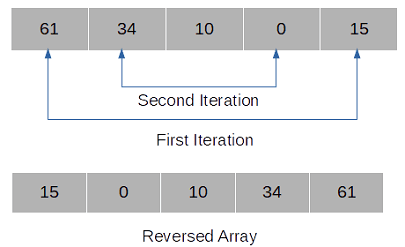
One thing to note here is that you don’t need to iterate the whole String, you need to iterate only n/2 String for the String of size n. Since the first and last chars, second and second last and so on are swapped in each iteration so by the time middle char is reached the String is already reversed.

Following image shows the same-

reverse string in place java
public class ReverseString {
  public static void main(String[] args) {
    String str = "Hello World";
    reverseString(str);
  }

  static void reverseString(String str) {
    StringBuilder sb = new StringBuilder(str);
    int n = sb.length();
    char temp;
    for (int i = 0; i < n / 2; i++) { 
      temp = sb.charAt(i);
      sb.setCharAt(i, sb.charAt(n - i - 1));
      sb.setCharAt(n - i - 1, temp);
    } 
    System.out.println("Reversed String- " + sb.toString());
  }
}
Output
Reversed String- dlroW olleH

As you can see in this program StringBuilder class and it’s setCharAt() method is used to reverse String.

Reverse String using char Array

Every String is internally stored as a char array so we can get that array and reverse it, reversing the String in the process. This program is similar to reversing an array in-place in Java.

public class ReverseString {
  public static void main(String[] args) {
    String str = "Hello World";
    reverseString(str);
  }

  static void reverseString(String str) {
    char[] charArr = str.toCharArray();
    int n = charArr.length;
    char temp;
    for (int i = 0; i < n / 2; i++) { 
      temp = charArr[i]; 
      // Swapping
      charArr[i] = charArr[n - i - 1]; 
      charArr[n - i - 1] = temp; 
    } 
    String rstr = new String(charArr);
    System.out.println("Reversed String- " + rstr);
  }
}
Output
Reversed String- dlroW olleH

Though the whole process of reversing is done using the space of the input String (which is internally stored as char array) itself but a new String is created using the reversed char array. Taking our argument that original string will get garbage collected we can say that we are left with a single object.

That's all for the topic Java Program to Reverse a String In-place. If something is missing or you have something to share about the topic please write a comment.


You may also like

January 8, 2026

JDBC Driver Types

JDBC API in Java programming language provides a standard, universal way to connect to databases. It is the responsibility of different DB vendors to provide the implementation of the interfaces in JDBC API and that implementation by DB vendors is provided as JDBC drivers.

Types of JDBC drivers

Based on these different implementations JDBC drivers are categorized into four types.

  • Type 1 driver: JDBC-ODBC bridge JDBC driver
  • Type 2 driver: Written partly in Java and partly in native code
  • Type 3 driver: Pure Java client and middleware server translating client request to data source.
  • Type 4 driver: Written completely in Java.

Type 1 JDBC Driver

Type 1 JDBC driver implements the JDBC API as a mapping to another data access API, such as ODBC (Open Database Connectivity).

The JDBC-ODBC Bridge driver is an example of type 1 JDBC driver that maps JDBC API requests to ODBC requests.

Disadvantages
  1. Type 1 driver is an old driver that is not supported any more by Oracle.
  2. These drivers are not fully written in Java and depends on native library so Type 1 drivers are not portable.
  3. Each JDBC call is mapped to ODBC request and then to DB making it very slow.
Type 1 JDBC driver

Type 2 JDBC Driver

Type 2 JDBC drivers are written partly in the Java programming language and partly in native code. These drivers use native client side libraries specific to the data source to which they connect to.

Oracle's OCI (Oracle Call Interface) client-side driver is an example of a Type 2 driver.

Disadvantages
  1. Since native libraries are required so there is platform dependency.
  2. JDBC calls are translated to native calls using native libraries making it a slow driver though not as slow as Type 1 driver.
  3. Native API must be installed on the client machines.
Type 2 JDBC Driver

Type 3 JDBC Driver

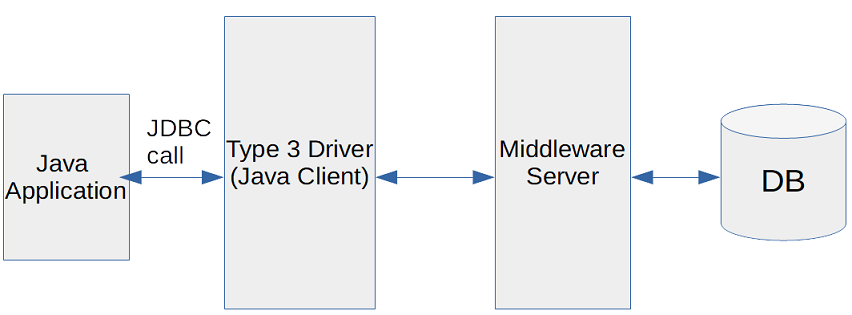
In Type 3 JDBC driver client is written in Java which connects to a middleware server using a database independent protocol. JDBC calls from the client are translated by middleware server to the vendor specific DB calls and then forwarded to the data source.

Disadvantages
  1. Requires a middleware server.
  2. Since there are two stages; JDBC call to midleware server then vendor specific translation and communication to the DB so the JDBC call processing takes more time.
Type 3 JDBC Driver

Type 4 JDBC Driver

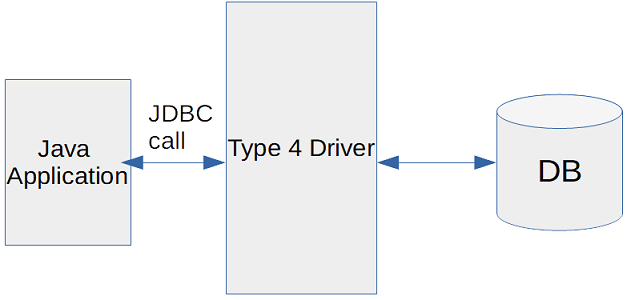
Type 4 JDBC drivers are written completely in Java and don't require any native code libraries or middleware server to sit in the middle. Type 4 drivers implement the network protocol for a specific data source and connect directly to data source.

Type 4 JDBC drivers are also known as thin drivers

Disadvantages
  1. Since driver itself implements the vendor specific network protocol so Type 4 drivers are DB specific and generally supplied by the DB vendors.
Type 4 JDBC Driver

That's all for the topic JDBC Driver Types. If something is missing or you have something to share about the topic please write a comment.


You may also like

Java Program to Count The Frequency of Each Character in a String

In this post we’ll see a Java program to count the frequency of each character in a string. Here two ways of counting the number of times each character appears in a String are given.

  1. Using HashMap where character is the key and count is the value. For every character you need to verify if the key already exists in the HashMap. If it does, increase the count otherwise add it to the map as a new key with count 1. See example.
  2. Another way is using char array where you will have to take the char at the first index of the array and iterate the whole array to check if that char is found again, if yes increment the count. At the end replace() method of the String class is used to remove all the occurrences of that character. See example.

Java program Using HashMap to count the frequency of each character

import java.util.HashMap;
import java.util.Map;
import java.util.Set;

public class CountChars {
  public static void main(String[] args) {
    CountChars.countCharactersMap("This is a test line");
  }
	
  public static void countCharactersMap(String str){
    Map<Character, Integer> charMap = new HashMap<Character, Integer>();
    for(int i = 0; i < str.length(); i++){
      char c = str.charAt(i);
      // For space or tab skip the process
      if(((c == ' ') || (c == '\t'))){
        continue;
      }
      // if character is already there in the map
      // increment the count
      if(charMap.containsKey(c)){
        charMap.put(c, charMap.get(c) + 1);
      }else{
        // If new character put that character in the map
        // with the value as 1
        charMap.put(c, 1);
      }
    }
    // Displaying the map values
    Set<Map.Entry<Character, Integer>> numSet = charMap.entrySet();
    for(Map.Entry<Character, Integer> m : numSet){
      System.out.println(m.getKey() + " - " + m.getValue());
    }
  }
}
Output
a - 1
s - 3
T - 1
t - 2
e - 2
h - 1
i - 3
l - 1
n - 1

Using char array and String replace() method

Here is a Java program to count the frequency of each character in a String using char array and String replace() method.

public class CountChars {
  public static void main(String[] args) {
    CountChars.countCharacters("This is a test line");
  }
	
  public static void countCharacters(String str){
    char[] strArr;
    do{
      strArr = str.toCharArray();
      char ch = strArr[0];
      int count = 1;
      for(int i = 1; i < strArr.length; i++){
        if(ch == strArr[i]){
          count++;
        }
      }
      // don't display for space or tab
      if(((ch != ' ') && (ch != '\t'))){
        System.out.println(ch + " - " + count);
      }
      // replace all occurrence of the character 
      // which is already counted
      str = str.replace(""+ch, "");
      // If string is of length 0 then come
      // out of the loop
      if(str.length() == 0) {
        break;
      }
    }while(strArr.length > 1);	
  }
}
Output
T - 1
h - 1
i - 3
s - 3
a - 1
t - 2
e - 2
l - 1
n - 1

That's all for the topic Java Program to Count The Frequency of Each Character in a String. If something is missing or you have something to share about the topic please write a comment.


You may also like